

Plutus Studio: Build Arcade Games, World Sims, and AI Chats — All in One Place
Plutus Studio is the only creator tool that lets you build arcade games, world sims, and AI chat simulations from the same interface. One prompt. Three modes. Infinite possibilities.
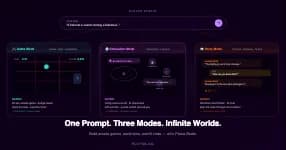
Most creator tools make you choose. You can build a game, or you can build a story, or you can build a simulation. Different tools, different platforms, different learning curves.
Plutus Studio doesn't work that way.
Studio is a single creation tool inside Plutus that handles three completely different types of experience — arcade games, simulation chats, and world sims — all from the same prompt-based interface. You describe what you want to build in plain English. The AI builds it. You refine it through conversation. You publish it for the Plutus community to play.
Whether your idea is a fast-paced gem-matching puzzle, a noir detective interrogation, or an entire simulated high school where AI characters live their own lives — Studio is where it gets made.
Here's how each mode works and when to use which.
Game Mode: build arcade games people compete in
Game Mode is for building playable, skill-based games. The output is the kind of thing you'd find in the Plutus Arcade — short-session, score-driven, competitive.
You describe a game concept: "A reaction speed game where colour words appear in mismatched font colours and you tap the actual colour, not the word. Gets faster every 10 correct answers." The AI generates a playable version in seconds. You test it, refine it with follow-up prompts ("add a combo multiplier," "make the background darker," "shake the screen on wrong answers"), and publish it.
Games built in Game Mode can be played solo, head-to-head against other players, or in structured tournaments with real prizes. The format is designed for short, intense sessions — usually 60 to 120 seconds — where skill determines the outcome.
This is the mode for you if your idea involves a score, a timer, reflexes, precision, or competition. Plutus games built in this mode join the Arcade library immediately upon publishing, where the community discovers, plays, and rates them.
Simulation Mode: build world sims where AI characters live
Simulation Mode is where Plutus gets genuinely different from anything else available to creators. This is the mode for building world sims — living environments where AI characters exist independently of the player, with their own routines, relationships, and motivations.
A world sim isn't a linear story. It's a place. You enter it, interact with its inhabitants, and the world responds. Characters talk to each other. Events happen in the background. Relationships shift based on what you do and don't do.
You build one by describing the world: "A 1920s speakeasy during Prohibition. The owner is secretly working with the police. The jazz singer is in love with the bartender. A federal agent walks in disguised as a customer." The AI generates the setting, the characters, and the web of relationships. You step in and the simulation runs.
The power of Simulation Mode is emergent behaviour. Because the AI characters have their own goals and secrets, things happen that you didn't explicitly program. The jazz singer might tip off the bartender about the agent. The owner might try to bribe you. A fight might break out because two characters have unresolved tension. The simulation creates moments that feel organic rather than scripted.
World sims built in this mode are published to the Plutus story chat and simulation library. They're designed for longer, more immersive sessions — players often return across multiple days to continue exploring the same world.
Story Mode: build AI chats with narrative and characters
Story Mode sits between Game Mode and Simulation Mode. It builds narrative-driven AI chats where the player takes on a role and interacts with AI characters through conversation. Think of it as interactive fiction powered by AI — the player steers the plot through dialogue.
Story Mode is more structured than Simulation Mode. There's typically a clear scenario, a defined set of characters, and a narrative arc. The AI handles the characters and the story progression, but the experience is more focused than an open-ended world sim.
You build a story by describing the scenario: "A thriller where the player is trapped in an elevator with a stranger who might be a serial killer. The conversation starts casual and slowly becomes more tense as the player notices inconsistencies in the stranger's story." The AI generates the character, the opening scene, and the conversational dynamics.
Story Mode is the right choice when your idea has a clear beginning, a core tension, and an emotional arc. Mystery chats, romance scenarios, psychological thrillers, comedy improv situations, and educational role-plays all work well in this format.
AI chats built in Story Mode are published to the Story Chat library at plutus.gg/story-chat.
Same tool, three outputs — why that matters
The reason all three modes live in the same Studio interface isn't just convenience. It's because ideas don't always arrive pre-categorised.
You might start with a concept — "a heist" — and not know whether it should be a fast-paced arcade game where you dodge lasers and crack safes on a timer, a simulation chat where you plan the heist through conversation with your crew, or a full world sim where the casino is a living environment and the heist unfolds over multiple sessions.
Studio lets you try all three without switching tools. Same prompt interface. Same refinement workflow. Same publish pipeline. You can build a Game Mode version and a Simulation Mode version of the same concept and see which one the community responds to.
This also means that a single creator can publish Plutus games across all three formats. Your audience might discover you through an arcade game, play your world sim next, and then try your mystery chat. Your creator profile on Plutus becomes a portfolio that spans genres and formats.
The creation workflow (same for all modes)
Regardless of which mode you choose, the creation process follows the same three phases:
Prompt. Describe what you want to build. Be specific about the core concept, the characters (for sims and stories), the mechanic or scenario, and the visual or tonal feel. One to three sentences is usually enough.
Play and test. Studio generates the experience and you try it immediately. For games, you play a round. For simulation chats, you enter the world and talk to the characters. For stories, you play through the opening scene.
Refine. Type follow-up prompts to adjust anything — speed, difficulty, character personality, setting details, rules, visual style. Each refinement updates the experience live. Most creators go through four to eight rounds of refinement.
When you're happy, publish. The experience goes live immediately — Plutus games to the Arcade, simulation chats and world sims to the story/simulation library.
What people have built across all three modes
The variety coming out of Plutus Studio is genuinely surprising, because the same tool produces such different outputs depending on the mode and the creator's vision.
In Game Mode, creators have built match-3 puzzles, tower stackers, knife-throwing precision games, gravity-flipping platformers, colour-reaction tests, word scrambles, rhythm games, brick breakers, space shooters, and experimental genres that don't have names yet.
In Simulation Mode, creators have built speakeasy world sims, high school simulations, space station environments, medieval courts with political intrigue, café sims where regular AI characters come and go with their own lives, and post-apocalyptic survival worlds where resources are scarce and alliances are fragile.
In Story Mode, creators have built noir detective mysteries, psychological thrillers, romance chats, comedy improv scenarios, horror stories, educational language tutors, historical roleplay scenarios, and workplace dramas.
All of this from the same tool. All published to the same platform. All discoverable by the same community.
Who Studio is built for
Studio serves three types of creators, and each type tends to gravitate toward different modes.
Casual experimenters — people who just want to see an idea come to life. They tend to start with Game Mode because the feedback loop is fastest. Type a prompt, play the game, show your friends. But many of them try Simulation Mode or Story Mode once and get hooked on the depth of what's possible.
Narrative creators — writers, storytellers, worldbuilders, DMs. These creators live in Simulation Mode and Story Mode. They're building worlds and characters, crafting scenarios, and designing experiences that players return to across sessions. The simulation chats and AI chats they publish tend to be the most deeply engaging content on Plutus.
Community builders — streamers, educators, Discord admins, content creators. They use all three modes strategically. A custom Plutus game for their community to compete in. A world sim themed around their brand. A story chat that lets fans interact with characters from their content.
All three groups use the same interface. The difference is what they create with it.
Frequently Asked Questions
What is Plutus Studio? Plutus Studio is an AI-powered creation tool inside Plutus that lets you build arcade games, world sims, and AI chat simulations from text prompts. No coding required. It has three modes — Game Mode, Simulation Mode, and Story Mode — each producing a different type of experience.
What's the difference between Simulation Mode and Story Mode? Simulation Mode builds open-ended world sims where AI characters have their own lives, goals, and routines. The player enters a living environment and interacts freely. Story Mode builds more structured narrative experiences with a clear scenario, character roles, and dramatic arc. Both use AI chats as the core interaction, but sims are open-ended while stories are more directed.
Do I need to learn three different tools? No. All three modes use the same prompt-based interface. You type a description, the AI builds it, and you refine through follow-up messages. The only difference is which mode you select before you start.
Can the same concept work in multiple modes? Yes. A "heist" concept could be a timer-based arcade game (Game Mode), a crew-planning conversation (Story Mode), or a fully simulated casino environment (Simulation Mode). Studio lets you try all three from the same tool.
Where do my creations go after I publish? Game Mode creations go to the Plutus Arcade. Story Mode creations go to the Story Chat library. Simulation Mode creations go to the simulation library. All are discoverable by the Plutus community immediately.
Does it cost money to use Studio? Creating in Studio uses AI creation credits, which are separate from Coins (used for competitive play). Credit packs and rates are listed on the Studio pricing page.
Open Plutus Studio at plutus.gg/studio. Pick a mode. Type an idea. Your game, sim, or story will be playable in seconds.